
By Ryan Zofay, executive time management tools high-performance strategist.
I’m Ryan Zofay — an executive performance coach and Neuro-Linguistic Programming (NLP) specialist. For over a decade, I’ve coached high-stakes entrepreneurs, founders, corporate leaders, and neurodivergent professionals. I help them build disciplined time management systems that produce measurable results. My work blends behavioral psychology with execution frameworks so leaders reduce overwhelm, improve decision-making, and consistently operate at their highest level.
If you feel overwhelmed, distracted, or constantly behind, it’s not a motivation problem. It’s a time management system problem. Over the past decade coaching entrepreneurs, executives, and high-performers, I’ve seen one consistent truth:
Productivity doesn’t improve when you try harder. It improves when you use the right tools.
What Are Time Management Tools?
The quick answer is that time management tools are apps, systems, and frameworks. They help you prioritize, plan, and complete your work with less stress and more consistency. They reduce cognitive load by externalizing your commitments—so you can focus on decisions, deep work, and outcomes.
- If you’re overwhelmed: you need a time management capture + prioritization system.
- If you’re distracted: you need focus protection + time-boxing.
- If you’re “busy” but not progressing: you need time tracking + weekly review.
According to leading productivity research, poor time management links to 60% of work hours spent on interruptions.

In the next sections, you’ll evaluate, compare, and apply 10 proven time management tools. You’ll discover the 10 best time management tools that add structure, cut distractions, and help you focus on what matters most. You’ll also learn when and why each tool works.
Jump To
Table of Contents
How to Use This Guide
To make this guide actionable, here’s how to approach it:
Step 1 — Identify Your Priority: Are you tracking tasks, blocking time, or scheduling meetings?
Step 2 — Tool Pairing: Tools work best when matched with a strategy (e.g., Pomodoro + time tracker).
Step 3 — Action Tip: After each tool section, apply one quick step you can do today.
Definitions:
Time blocking is a time-management method. You divide your day into clear time blocks. Each block is set for a specific task or type of work.
Instead of using a simple to-do list, you decide what you will work on and when you will do it.
Why It Works
Time blocking improves:
- Focus – You eliminate decision fatigue because you already decided what to work on.
- Execution – Tasks get done because they have scheduled space.
- Boundary control – Meetings and distractions can’t consume your entire day.
- Realistic planning – You see how much time you actually have.
It also reduces context switching, which is one of the biggest productivity drains.
What Time Blocking Is Not
- It is not multitasking.
- It is not reacting to your inbox all day.
- It is not a loose “I’ll get to it when I can” schedule.
It is structured, intentional, and proactive.
How to Choose the Right Time Management Tools
The biggest mistake I see leaders make is downloading tools without diagnosing the real bottleneck. Choose tools based on the constraint you’re trying to solve:
1) Are you managing tasks, time, or priorities?
- Tasks: capture, organize, and execute (e.g., Todoist)
- Time: schedule reality, protect focus (e.g., Google Calendar)
- Priorities: decide what matters most (e.g., Eisenhower Matrix)
2) Do you need focus protection?
If distraction is your main issue, you do not need a better planner. You need friction to stop attention leaks. For example, use RescueTime with the Pomodoro method.
3) Do you need analytics?
If your weeks “disappear,” add time tracking for 7 days. Measurement removes guessing and exposes the real pattern.
My rule: Start simple. Earn complexity with results.

Best Time Management Tools Compared
If you want the fastest path to implementation, use this comparison chart to match the tool to your situation. Time management apps can change your day and boost your productivity.
| Tool | Category | Best For | Unique Value | Coaching Insight |
|---|---|---|---|---|
| Google Calendar | Scheduling | Time blocking & structure | Turns intention into allocated time | Best “keystone” tool for leaders. Free version available. |
| Todoist | Task Management | Daily priorities & follow-through | Capture + prioritize quickly | Great for reducing mental clutter. Free version available. |
| Clockify | Time Tracking | Weekly analytics & time audits | Shows where time actually goes | Run it 7 days for pattern truth. Free version available. |
| Notion | All-in-One | Strategy + planning dashboards | Second brain + customized workflows | Best for founders building systems. Free version available. |
| Trello | Workflow | Visual project management | Boards make work visible | Excellent for creative teams. Free version available. |
| RescueTime | Focus Analytics | Reducing distractions | Tracks apps/sites + attention leaks | Best “wake-up call” tool. Limited free version available. |
| Pomodoro Timer | Execution | Deep work sessions | Time-boxing boosts attention | Use 50/10 for executives. Many free versions available. |
| Asana | Team Ops | Accountability at scale | Ownership + timelines | Stops “who owns this?” chaos. Free version available. |
| TickTick | Habits + Tasks | Consistency & routines | Tasks + habits + built-in timer | Good for routine builders. Free version available. |
| Eisenhower Matrix | Prioritization | Strategic decision-making | Separates urgent from important | Most leaders need this weekly. Free templates widely available. |
Tip: Start with Google Calendar + Todoist. Add Clockify for a 7-day audit if you’re unsure where time is going.
The Best 10 Time Management Tools With Executive Coaching Insights
Great time management isn’t a myth. It’s a skill, supported by tools. These tools shape your workflow, cut distractions, and help you do the right things on time. Whether you’re an entrepreneur, employee, student, or creative professional, the right tools change how your day unfolds.
Time is our most valuable resource, yet many people don’t know how to use it effectively. Rediscovering life changing time management tools not only helped me reclaim my focus but turned my life around. Propelling me into becoming a successful multi-millionaire entrepreneur and coach.
According to leading productivity research, poor time management links to 60% of work hours spent on interruptions.
In the next sections, you’ll evaluate, compare, and apply 10 proven time management tools. You’ll also learn when and why each tool works.
Top 10 Tools for Productivity & Focus
If you’ve ever felt like there aren’t enough hours in the day, you’re not alone. In this expert guide, I share the most useful tools that helped me go from overwhelmed to focused. I also explain why they work for anyone who wants more focus, clarity, and results.
Below are the tools I use personally and recommend most often in executive coaching.
1) Google Calendar + Time Blocking
A simple scheduling system. Great for structured daily planning. Time blocking is one of the most powerful productivity systems available. Instead of managing tasks, you assign tasks to specific time slots.
Best for: turning priorities into protected time.
If I could only teach one time management tool, it would be time blocking. Most people manage a task list. High performers manage time allocation.
Why It Works: Prevents over-commitment. Forces realistic scheduling. Reduces reactive decision making. It is best for entrepreneurs
Google Calendar kept me anchored when I felt lost. Its simple scheduling system ensures nothing slips through the cracks. I recommend time blocking with calendar tools—assign specific time slots for work priorities and even breaks. It’s not just for reminders; it’s a roadmap for your day.
How I Use It
- Deep work: 90-minute blocks in the morning
- Admin batching: 30–60 minutes midday
- Meeting windows: clustered to prevent fragmentation
- White space: buffers so the day doesn’t collapse
Common Mistake: Overpacking the calendar and leaving no buffers—then blaming “lack of discipline.”
Quick Action Step (Today): Block one 60–90 minute focus session tomorrow morning for your most important priority. Protect it like a client meeting.
2) Todoist
Task listing and prioritization. Todoist turns scattered to-dos into structured execution.
Best for: capturing and prioritizing daily execution.
Overwhelm is often “too many open loops.” Todoist gives you a trusted capture system so your brain can stop carrying everything.
Key Features: Priority levels. Recurring tasks. Deadline reminders. Project categories.
When I felt overwhelmed by endless tasks, Todoist became indispensable. It’s one of the most effective time management tools for work. This app helps you list, sort, and prioritize tasks visually with due dates.
Ideal for individuals managing multiple responsibilities. And for professionals who need clear daily action lists.
Insight: Use it with time blocking for maximum effectiveness.
Apply the Eisenhower Matrix within Todoist to distinguish between urgent, important, and lower-priority tasks.
How I Use It
- Create lists: Today, This Week, Waiting/Follow-Up
- Choose 1 critical priority + 2 secondary priorities each morning
Common Mistake: 15 priorities is not priorities. It’s a stress list.
Quick Action Step: Pick your Top 3 tasks for tomorrow and time block them.
3) Clockify
Time tracking and analysis. Great for time tracking & productivity analysis.
Best for: finding time leaks and optimizing your week.
I’ve coached leaders who swear they work “12 productive hours,” then discover they’re getting 2–3 hours of real deep work. Tracking doesn’t judge—it reveals.
What It Tracks: Time spent on tasks. Project breakdowns. Billable vs non-billable hours.
Ever felt like your hours vanish without a trace? That used to happen to me until I started tracking where my time goes. Clockify allowed me to analyze my day and make necessary adjustments.
Why It’s Powerful: You can’t optimize what you don’t measure. Another top productivity tool for entrepreneurs
Keep track of your time for a week. This will help you find distractions or tasks that aren’t worth it. You can then focus on more meaningful work.
How I Use It
- Track for 7 days (not forever)
- Use categories: Deep Work, Meetings, Admin, Reactive
- Review every Friday in a 15-minute weekly audit
Common Mistake: Inconsistent tracking—you only need a clean 7-day sample to learn a lot.
Quick Action Step: Track tomorrow in 3 categories only: Focus, Meetings, Admin.
4) Notion
All-in-one digital workspace. Great for an all-in-one organization. Notion combines: Task management. Notes. Databases. Planning dashboards. It’s powerful for entrepreneurs or teams that want everything centralized.
Best for: entrepreneurs or anyone building a “second brain” and strategic dashboards.
For founders and leaders, Notion becomes the place where strategy lives—OKRs, meeting notes, quarterly planning, and repeatable playbooks.
Why It’s Effective: It reduces tool fragmentation — one workspace instead of five apps.
Notion became my all-in-one digital workspace. It’s ideal for journaling progress, project management, and even documenting time management tools for work. You can create customized workflows and templates for any area of life.
Use Notion’s collaboration features to share plans and goals with your team or accountability partner. Learn more on how to change your life with Notion goals.
How I Use It
- Weekly planning dashboard (priorities + KPIs)
- Decision log (what I decided and why)
- Reusable templates for recurring workflows
Common Mistake: uilding a beautiful system you never use. Start with one dashboard and expand only after itorks.
Quick Action Step: Create a simple “Weekly Outcomes” page with 3 goals for the week.
5) Trello
Visual workflow management. Ideal For: Visual thinkers. Great for teams managing projects. Content planning.
Best for: visual workflows and project stages.
Trello uses drag-and-drop boards to move tasks from: To-Do. Doing. Done.
Trello introduced me to visual organization. Whether I manage a growing team or my own goals, I organize tasks on movable cards and boards. This makes workloads easy to see.
For managers, use it as a time management tool for employees. Assign team tasks, set clear deadlines, and monitor progress in real-time. A good consideration for time management tools for work.
How I Use It
- Columns: Backlog, Next, Doing, Done
- Labels for Impact and Urgency (not just categories)
Common Mistake: Too many cards in “Doing.” WIP (work in progress) limits protect attention.
Quick Action Step: Move only 1–3 items into “Doing” and finish them before adding more.
6) RescueTime
Digital activity tracking.
Best for: detecting and reducing digital distractions.
This is one of my favorite “truth tools.” It shows where attention leaks occur—social, email loops, constant tab switching.
This tool runs in the background and tracks: App usage. Website usage. Focus time vs distraction time.
One of the best productivity and time management tools, RescueTime tracks your digital activities. It shows exactly where your time goes. Seeing my hours spent scrolling on social media was a wake-up call that fueled real change.
Rescue Time provides alerts when you exceed distraction limits. If procrastination is your issue, this tool is transformative.
Set daily goals on RescueTime to limit distractions and spend time more productively. It provides detailed reports categorizing time spent on productive, unproductive, and neutral activities.
How I Use It
- Set distraction alerts during deep work hours
- Create focus rules (e.g., limit social sites to X minutes)
Common Mistake: Trying to eliminate all distraction. The goal is to control it, not deny reality.
Quick Action Step: Set one rule: no social sites during your first focus block.
7) Pomodoro Timers (Focus Sessions)
Pomodoro Timers (focus booster, forest, etc.) are great for deep work sessions and ADHD time management tools. Great for focus challenges.
Best for: sustained attention through time-boxed execution.
My Recommended Timing
- Standard: 25/5 cycles for general work
- Executive Deep Work: 50/10 cycles for strategy, writing, planning
The Pomodoro technique uses: 25 minutes focused work. 5-minute break. Repeat 4 cycles.
When I found it hard to focus, especially during tough times, the Pomodoro Technique kept me disciplined. It breaks work into 25-minute sessions with 5-minute breaks. Simple, but incredibly effective, especially as ADHD time management tools.
This structure reduces burnout and increases sustained focus.
Use timers like Focus Keeper to implement the Pomodoro Method, which involves 25-minute work sessions followed by 5-minute breaks. This helps avoid burnout and maintains focus. This is also a good consideration for time management tools for ADHD adults.
Common Mistake: Using Pomodoro to multitask faster. The tool is designed for single-task intensity.
Quick Action Step: Run one 50-minute focus sprint today and write down what you completed.
8) Asana
Team productivity & accountability tool.
Best for: team execution, accountability, and deadlines.
How I Recommend Using It
- Assign every task an owner and a deadline
- Use one weekly “ops review” meeting to update projects (not daily firefighting)
Asana excels in task delegation, timeline views, and project tracking. If you manage a team, this keeps everyone aligned.
Common Mistake: Using Asana as a dumping ground. If tasks aren’t reviewed weekly, the system collapses.
Quick Action Step: Pick one project. Define: owner, next action, deadline.
9) TickTick
Great for habit + task integration. Great for ADHD or focus challenged individuals.
Best for: combining habits, tasks, and focus sessions.
TickTick blends tasks, calendar, habit tracking, and built-in Pomodoro. Works well for people building daily routines.
Why I Like It: Many leaders don’t need more goals—they need better consistency. TickTick helps build the routine layer that makes time management stick.
Quick Action Step: Choose one habit that reduces chaos (e.g., daily plan in 5 minutes) and track it for 7 days.
10) Eisenhower Matrix (Priority Matrix)
Eisenhower Matrix Tools offer a priority matrix with task prioritization technique. Useful for strategic prioritization.
Best for: prioritizing what matters and eliminating noise.
One technique that completely changed my approach to productivity is the Eisenhower Matrix. It’s a time management tool that helps you prioritize tasks. It does this by dividing them into four categories based on urgency and importance.
This method categorizes tasks into: Urgent, Not Urgent, Important, Schedule, Not Important, or Eliminate. It forces clarity around what truly matters.
Consistently focus on tasks that are important but not urgent—this is where real growth happens.
How I Teach It: Leaders get trapped in “urgent” work. The matrix forces you to separate importance from urgency. True growth lives in Important but Not Urgent.
| Urgent | Not Urgent | |
|---|---|---|
| Important | Do / Delegate | Schedule (Growth) |
| Not Important | Delegate / Automate | Eliminate |
Weekly tip: Schedule one “Important, Not Urgent” block every week. That’s where momentum comes from.
Quick Action Step: Sort today’s tasks into the four quadrants in 5 minutes before you start work.
The Ryan Zofay Time Management System
The Ryan Zofay Life changing time management system is designed for success. Time management isn’t just about cramming as many tasks as possible into your calendar. It’s about working smarter, not harder. But I get it—if you’re like me, you don’t want to waste time learning overly complicated systems. You want life changing time management tools that are powerful, yet straightforward and effective.
So, here’s a simple cycle you can follow. Capture (Task Manager) → Schedule (Calendar) → Execute (Pomodoro Timer) → Review (Weekly Planning) → Reinforce (Habit Tracker) → Capture (Repeat Cycle).
How to Build a Simple Productivity System (Step-by-Step)
You don’t need 10 tools to become productive. In fact, many leaders hurt results by overcomplicating their stack. When I coach executives, I start with a simple system that creates clarity fast—and scales with your workload. Instead of using 10 tools, start with this simple system:
The Simple Stack (Start Here)
- Google Calendar for time blocking (your schedule becomes your plan)
- Todoist for daily priorities (your tasks become organized and actionable)
- Clockify for weekly analytics (your time becomes measurable)
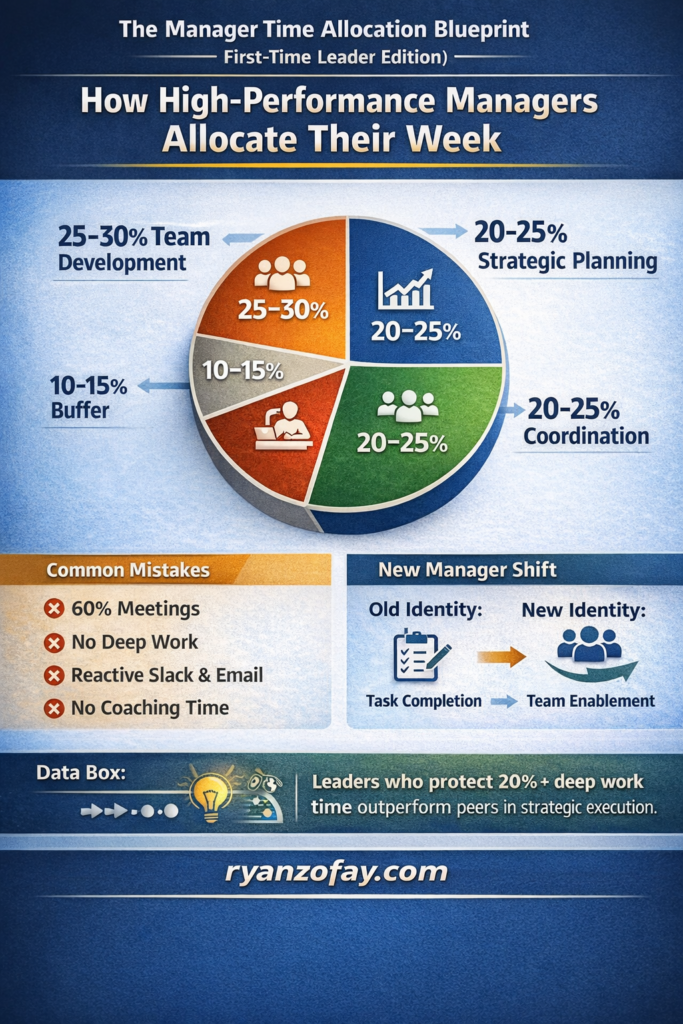
Techniques Time Managment Tools Support
The best time management tools mentioned above go beyond convenience. They enable powerful techniques like:
- Task Prioritization: Identify high-value tasks daily.
- Time Blocking: Plan your day around your top three priorities by assigning time slots in a tool like Google Calendar.
- Visual Organization: Tools like Trello make multi-project management easy and effective.
- Time Tracking: Monitoring with apps like Clockify leads to long-term efficiency.

Best Time Management Tools by Use Case
Best for Entrepreneurs & Founders
- Google Calendar (time blocking)
- Notion (strategy dashboards)
- Todoist (daily execution)
I swear by time-blocking. This technique involves dedicating specific chunks of your day to specific tasks. It’s easy to do with tools like Google Calendar, and it keeps you from multitasking (a productivity killer).
Best for Teams & Managers
- Asana (accountability + timelines)
- Trello (visual workflow)
- Google Calendar (meeting windows + focus protection)
The 80/20 Rule: The Pareto Principle taught me that 20% of your tasks deliver 80% of your results. Focus on what truly matters instead of trying to “do it all.”
Best for ADHD / Focus Challenges
- RescueTime (distraction awareness)
- Pomodoro timers (structured focus sprints)
- TickTick (routine + habit reinforcement)
How are life changing time management tools designed for Success
Time management isn’t just about cramming as many tasks as possible into your calendar. It’s about working smarter, not harder. But I get it—if you’re like me, you don’t want to waste time learning overly complicated systems. You want life changing time management tools that are powerful, yet straightforward and effective. When I found the right time management tools, I was able to:
- Prioritize my most important tasks and activities.
- Stay organized despite my ongoing battle with ADHD.
- Create space in my day for personal growth and reflection.
- Find a balance between my business, my family, and myself.
If these life changing time management tools could help turn my life around, it can do the same for you.
Great time management isn’t a myth. It’s a skill, supported by tools. These tools shape your workflow, cut distractions, and help you do the right things on time. Whether you’re an entrepreneur, employee, student, or creative professional, the right tools change how your day unfolds.
Life-Changing Time Management Tools That Helped Drive My Success
My Personal Time Management Tools Success Story
From Homeless to Multi-Millionaire
I’m a leader, entrepreneur and business coach today, but my life wasn’t always this way. There was a time when chaos ruled my life. Then I found some of the best time management tools and strategies. They completely transformed my life. From being homeless to building a multimillion-dollar empire, these tools played a massive role in my success. Whether you’re managing ADHD, growing a business, or getting your workday under control, these tools can change your life too.
I’m proof that you can turn your life around with life-changing time management tools, even when it feels dark. During my early years, I was homeless. I used drugs and alcohol. I was held in juvenile detention. My future felt uncertain. Life had thrown obstacle after obstacle my way, and I struggled to see a path forward. I hit a point where I knew something had to change.
How Time Management Propelled My Success
When I started using these life changing time management tools, I watched tasks that previously overwhelmed me become manageable. It gave me the ability to strategize as both a business leader and coach. Building discipline over time helped me focus on the big picture. I aimed to create a successful multi-million-dollar empire and assist others in doing the same.
Now, I work with aspiring entrepreneurs, employees looking to change their careers, and individuals seeking control over their time. My goal is to equip people with time management tools and techniques that empower them to reshape their realities.
Adopting life changing time management tools with a new positive mindset
What set me on a new course wasn’t luck or a miracle. It was my decision to take control of two things. I could still manage my time and my mindset. That’s where my obsession with life-changing time management tools began.
Since using professional time management tools, I went from rock bottom to building a multi-million-dollar business. I also coach others to reach their full potential. Along the way, I’ve worked with employees, managers, and entrepreneurs struggling to balance work, productivity, and self-doubt. Today, I share my proven strategies for using life-changing time management tools. I help people improve their lives and achieve great success.
The Power of life changing time management tools For Success
For anyone wondering which time management tool helps you prioritize tasks, the answer isn’t complicated. It’s the one you use consistently. My transformation wouldn’t have been possible without staying focused on key techniques. These were made possible by the ultimate, life-changing time management tools. Time management tools can help anyone, whether facing personal struggles, juggling a demanding job, or building a startup.
Here’s how life-changing time management tools propelled me from homelessness to success:
1. Prioritization = Focused Progress
When my life was at its lowest, I realized that not all tasks are equal. It’s easy to get overwhelmed with everything you feel you should do. But the truth is, only some actions truly push the needle forward.
I started each day by asking myself, “What’s the most impactful task I can do today?” Using this mindset, I focused on high-value work that matched my goals. I also cut out the clutter of unimportant distractions.
✨ Time Management Tool: My “High-Impact Task Planner” breaks down your priorities—and cuts the noise so you can focus on what matters.
2. The Game-Changer: Time Blocking
Discovering time blocking was like flipping a switch. By assigning set time blocks to key tasks, I could better manage my energy and stay productive without burnout. This wasn’t just a time-management trick—it became a way to take back ownership of my day.
Whether you’re an employee balancing tasks or an entrepreneur growing your business, time blocking is a great tool. It helps with productivity and time management. It focused my chaotic days and allowed me to track progress on big goals step by step.
✨ Try My Time Management Essentials Workbook: Design your schedule with intention and accountability.
3. Mindset is Everything
I’ll tell you this: time management won’t work without the right mindset. After struggling with self-doubt for so long, I knew I had to reframe how I looked at challenges.
What looked like a failure was an opportunity to grow. What felt like rejection was often redirection. By adopting a growth mindset, I could handle setbacks with resilience and clarity—and I teach my clients how to do the same.
✨ Insightful Lesson: Check out my Mindset Transformation Course, where I share personal techniques that helped me overcome obstacles.
4. Systems Beat Willpower
Willpower is great, but systems win every time. Success is a byproduct of consistency, not motivation. Building routines and habits, like a 10-minute daily planning session or a weekly review, helped me stay on track. It worked even when life got unpredictable.
If you’ve been looking for time management tools for work that help your team, custom systems like these can help a lot.
✨ Success Starter: My 90-Day Action Planner offers a step-by-step framework to turn lofty goals into actionable tasks.
I now teach popular, life-changing time management tools and other resources. I teach employees, job seekers, and people with ADHD too.
Leveraging life changing time management tools for Employees & Teams
When it comes to using life-changing time management tools, the best use is at work for employees, managers, and teams. Over the years, I’ve worked one-on-one with managers and teams to boost workspace productivity. Time management isn’t just a personal thing—it’s a game-changer for organizations. Employees often feel overwhelmed by juggling tasks. Many struggle without knowing which time management tool helps them prioritize tasks and activities.
That’s where I come in. By incorporating tools like prioritization systems and collaborative planning platforms, I’ve seen employees transform from overloaded to empowered. Work becomes not just manageable but impactful.
✨ Looking for ways to maximize your team’s productivity? Join me to uncover time management tools for employees in my exclusive High-Performance Mastermind Programs.
Life changing time management tools can take us from Chaos to Clarity—and Beyond
Here’s what I want you to remember. Whether you’re a manager leading a team, an employee seeking balance, or rebuilding like I did. Your past does not define your future.
The same life changing time management tools that helped me build a thriving, purpose-driven business can work for you. Whether you use time blocking, prioritizing, or daily goal steps, time management tools and techniques can unlock your potential.
And I’m not just here to share my story—I’m here to help YOU rewrite yours.
✨ Next Steps
- Save my Time Management Mastery Guide to start building the life you deserve.
- Join for my Productivity Coaching Program for personalized strategies tailored to your goals.
- Join my High-Performance Mastermind Group to connect with a community of motivated individuals.
Together, we can transform your challenges into opportunities and your time into the most valuable resource driving success.
Remember that bad time management affects more than just deadlines. It can impact all parts of life, including relationships and physical health. When I started using time management techniques, I gained valuable hours each day. I felt less overwhelmed and began focusing on what really mattered. All of this led to a healthier, more productive life.
Based on my experience and coaching career, I have found the best tool for time management. It can change your day and boost your productivity.

Claim Your Call
Claim your free next level strategy call. Select your date and time. Get guidance and insights. Find answers to your questions. Gain focus, and belief in yourself with No excuses holding you back.

Join the 1%
Seize opportunity. Make the Most of Your Life! Live Without Limitations. Overpower Challenges. Grasp Opportunities to make the Most of Each Moment. Propel & Surpass Others.
How to Build a Simple Productivity System Step-by-Step
You don’t need 10 tools to become productive. In fact, most people destroy their productivity by overcomplicating it. When I coach executives and high performers, I almost always start them with a simple 3-tool stack. It creates clarity fast, and it’s sustainable.
Instead of using 10 tools, start with this simple system:
- Google Calendar for time blocking (your schedule becomes your plan)
- Todoist for daily priorities (your tasks become organized and actionable)
- Clockify for weekly analytics (your time becomes measurable)
Then you run it like a 7-day experiment.
The Ryan Zofay Time Management Productively System 7×7 (7 Day 7 Step Cyle)
Step 1: Capture Everything (Todoist)
Before you can manage your time, you need to remove the mental clutter. Overwhelm is often caused by open loops. Do a 5-minute brain dump: tasks, ideas, follow-ups, and obligations. Your brain is for thinking, not storing unfinished work. Apply one quick step you can do today.
Before you can manage your time, you need to remove the mental clutter. What to do? Open Todoist. Create 3 categories: Today, This Week and Waiting / Follow-Up. Then do a quick 5-minute brain dump. Every task, idea, obligation, and reminder goes in Todoist.
Why this works:
Your brain is for thinking — not for storing unfinished tasks. When people say they feel overwhelmed, what they really mean is:
“I have too many open loops.”
Todoist closes the loops by capturing them.
Step 2: Prioritize Like a Leader (Todoist)
Most people prioritize based on urgency.Identify Your Priority: Are you tracking tasks, blocking time, or scheduling meetings? Most people prioritize based on urgency. Whereas high performers prioritize based on impact.
Each morning, choose:
- 1 critical priority (the needle mover)
- 2 secondary priorities
- 3–5 smaller tasks (optional)
If everything is a priority, nothing is. Remember, if your list has 15 “top priorities,” you don’t have priorities — you have chaos.
Pro Tip: If everything matters, nothing matters.
Step 3: Time Block Your Day (Google Calendar)
Now you move from intention to execution. You’re not just writing tasks down — you’re assigning them time. Assign your priorities to real time. Use four block types:
Create these 4 block types:
1) Deep Work Blocks
- 60–90 minutes
- Phone on Do Not Disturb
- No meetings
- One high-value task only
2) Admin Blocks
- 30–60 minutes
- Email, Slack, follow-ups, scheduling
- Batching prevents constant interruption
3) Meeting Blocks
Cluster meetings into blocked windows to protect focus. Avoid scattered meetings across the day. This protects your focus and prevents your day from becoming fragmented.
4) Buffer Blocks
Add 15–30 minutes of white space. Because real life happens. This protects your plan from reality.
Because real life happens interrupting your flow and day.
Step 4: Use the “Two-List Rule” to Stay Focused
This is one of the most effective systems I teach.
You only get:
- A calendar (your plan)
- One task list (your capture system)
If you’re using sticky notes, a notes app, 3 planners, and 2 task apps…
You’re not organized — you’re scattered.
Step 5: Track Reality (Clockify) for 7 Days
This is where most people level up fast. Because once you measure your time, you stop guessing.
Track in just three categories: Deep Work, Meetings, Admin / Reactive Work. Then review what the data says—not what your feelings say. Apply tool pairing. Tools work best when matched with a strategy (e.g., Pomodoro + time tracker).
Why: Most professionals are shocked by how little deep work they actually get. This is one of the most effective systems I teach. You only get a calendar (your plan), one task list (your capture system). If you’re using sticky notes, a notes app, 3 planners, and 2 task apps, you’re not organized. You’re scattered.
Clockify gives you the truth — and the truth creates change.
Step 6: Run a Daily Reflection and progress to Weekly Review (15 Minutes)
Daily Reflection:
Track reality (Clockify). At the end of every day, I take 5 minutes to reflect. I ask myself:
- How can I make tomorrow more productive?
- What did I accomplish?
- What could I have done better?
Followed by a weekly review (15 Minutes)
- What worked? When did you get the best output?
- What didn’t? Where did time leak?
- What will I change next week? More deep work, fewer meeting windows, better batching.
Track in 3 categories: Meetings / Deep Work / Reactive Work. Test it for 7 days. Adjust based on data — not emotion. Why? Most professionals are shocked by how little deep work they actually get. Clockify gives you the truth — and the truth creates change.
This is how you build a real system. Not based on motivation. Based on data.
At the end of the week, ask:
What worked?
- When was I most focused?
- What blocks produced the most output?
What didn’t work?
- Where did time leak?
- Which meetings were unnecessary?
What will I change next week?
- Move deep work earlier
- Reduce meeting windows
- Batch admin time
This is how you build a real system.
Not based on motivation.
Based on data.
Step 7: Adjust Based on Data — Not Emotion
This is the difference between average performers and high performers. Most people change their system based on feelings. But feelings are unreliable. Your time data is reliable.
Do not change your system based on emotions:
- “I felt unproductive.”
- “I felt behind.”
- “I felt overwhelmed.”
But feelings are unreliable. Whereas your time data is reliable. Clockify shows:
- What actually happened
- What your patterns are
- What your biggest leaks are
Then you make adjustments strategically.
The 7-Day Productivity Challenge (My Recommendation)
If you want to implement this fast, do this:
Day 1
- Set up Todoist categories
- Brain dump tasks
Day 2
- Choose 1–3 priorities
- Time block them in Google Calendar
Day 3–7
- Track your time in Clockify
- Protect deep work blocks
End of Day 7
- Review your data
- Adjust your system for Week 2
Final Reminder From My Coaching Work
You don’t need more discipline.
You need a system that reduces friction.
When you build a simple productivity stack and run it consistently for 7 days, you create:
- clarity
- momentum
- confidence
- measurable progress
And from there, scaling your productivity becomes easy.
Because you’re no longer guessing.
You’re operating with structure.
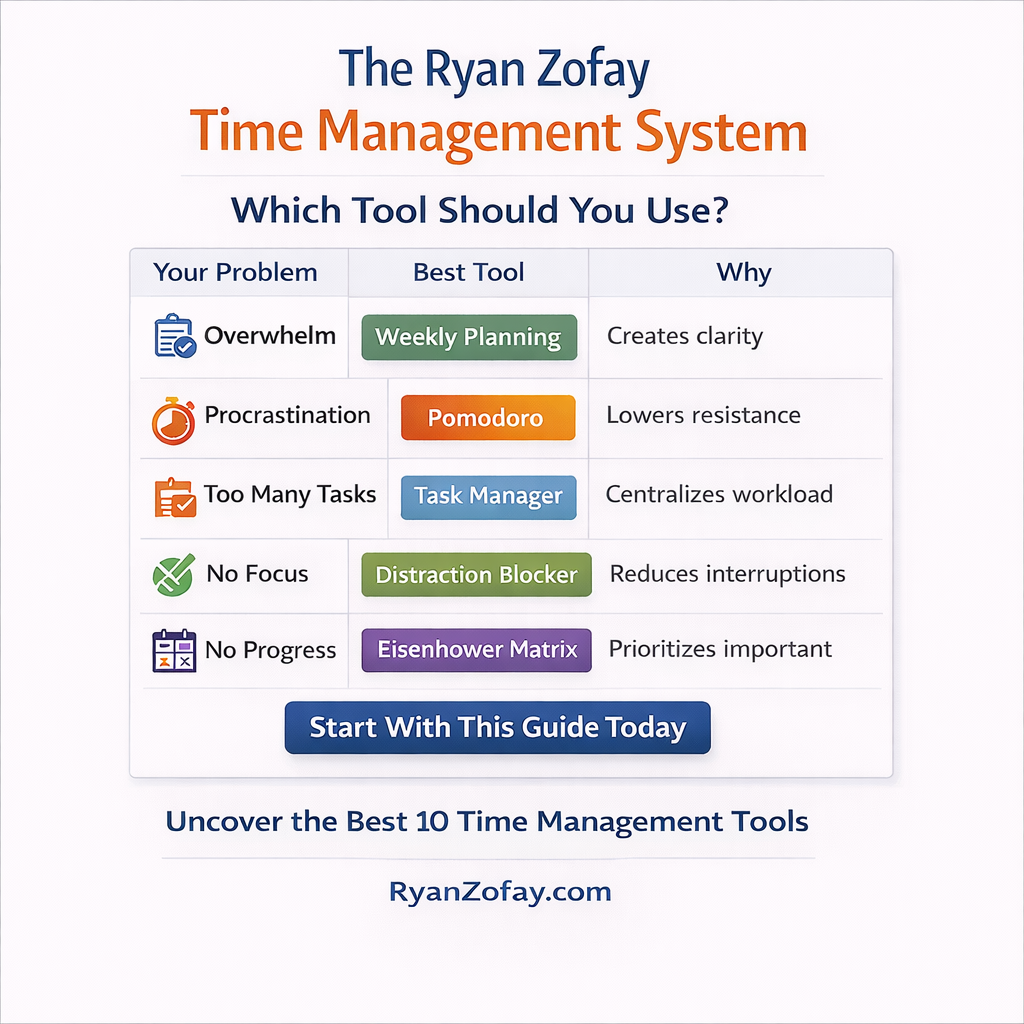
FAQs
What is the Best Time Management tool for ADHD or focus challenges
Google Calendar and Todoist offer powerful free versions suitable for most users.
How many time blocks should I schedule per day?
Most high performers schedule 3–5 focused blocks per day, depending on workload.
What is the best time management tool overall?
For most people, the best basic tool is Google Calendar with time blocking. It turns priorities into protected time.
Can time management tools reduce stress?
If you feel constantly behind, time tracking can reveal hidden inefficiencies.
Are free time management tools good enough?
Yes. Many free plans can be sufficient to build strong systems. Consistency matters more than premium features.
How long should I test a time management tool before deciding?
Test for 7 days. That’s long enough to see patterns, short enough to stay honest and consistent.
Do time management tools help reduce Feeling overwhelmed?
Yes—because they externalize tasks and structure decisions. Less mental clutter typically means more clarity and calmer execution.
Tools Create Clarity (When You Use Them Correctly)
Time management isn’t about doing more. It’s about doing the right things with structure. Start simple: Calendar + Task List + Weekly Audit. Earn complexity with results.
Next Steps
- Pick 2 tools from this list and implement them today.
- Run the 7-day test with time blocking + weekly review.
- Use your data to optimize your schedule, not your mood.
Want help building a personalized executive productivity system?
Explore executive coaching or book a strategy call.
Start Where You Are
You don’t need to perfect every tool overnight. Start with one or two that resonate with your needs. If you want to stop procrastinating or be a better manager, these time management tools can help you.
Looking back, I realize one truth—success starts with mastering your time. If I hadn’t created a system to stay focused, prioritize tasks, and remove distractions, I wouldn’t be where I am today.
These tools and strategies aren’t one-size-fits-all but are a great place to start. Try one, tweak it, and see how it works for you. Trust me—it’s worth it.
If you’re ready to control your time, try these life-changing time management tools today. You’ve got what it takes, and success is closer than you think.

And remember—you’re not alone. I’d love to guide you further. If you’re curious about how to integrate these tools into your work or life, reach out today.
Time is on your side when you know how to manage it.
Resource and Sources
Here is a list of Ryan Zofay’s time management success-related videos. These videos provide insights into Ryan Zofay’s transformative journey, mindset strategies, and tools for achieving personal and professional success.
Citations:
[1] https://www.youtube.com/watch?v=eSOdHO0e1sk
[2] https://ryanzofay.com
[3] https://www.youtube.com/watch?v=hp–VLj_itg
[4] https://ryanzofay.com/9-figure-masterclass/
[5] https://www.youtube.com/watch?v=tAl90aAkr5U
[6] https://www.youtube.com/watch?v=8kt-XccutuU
[7] https://ryanzofay.com/standards-for-success/
[8] https://www.youtube.com/watch?v=R0lFp4Wggo8

Pingback: Kate